What Is Gaussian Splatting? A VFX Guide to 3D Gaussian Splats
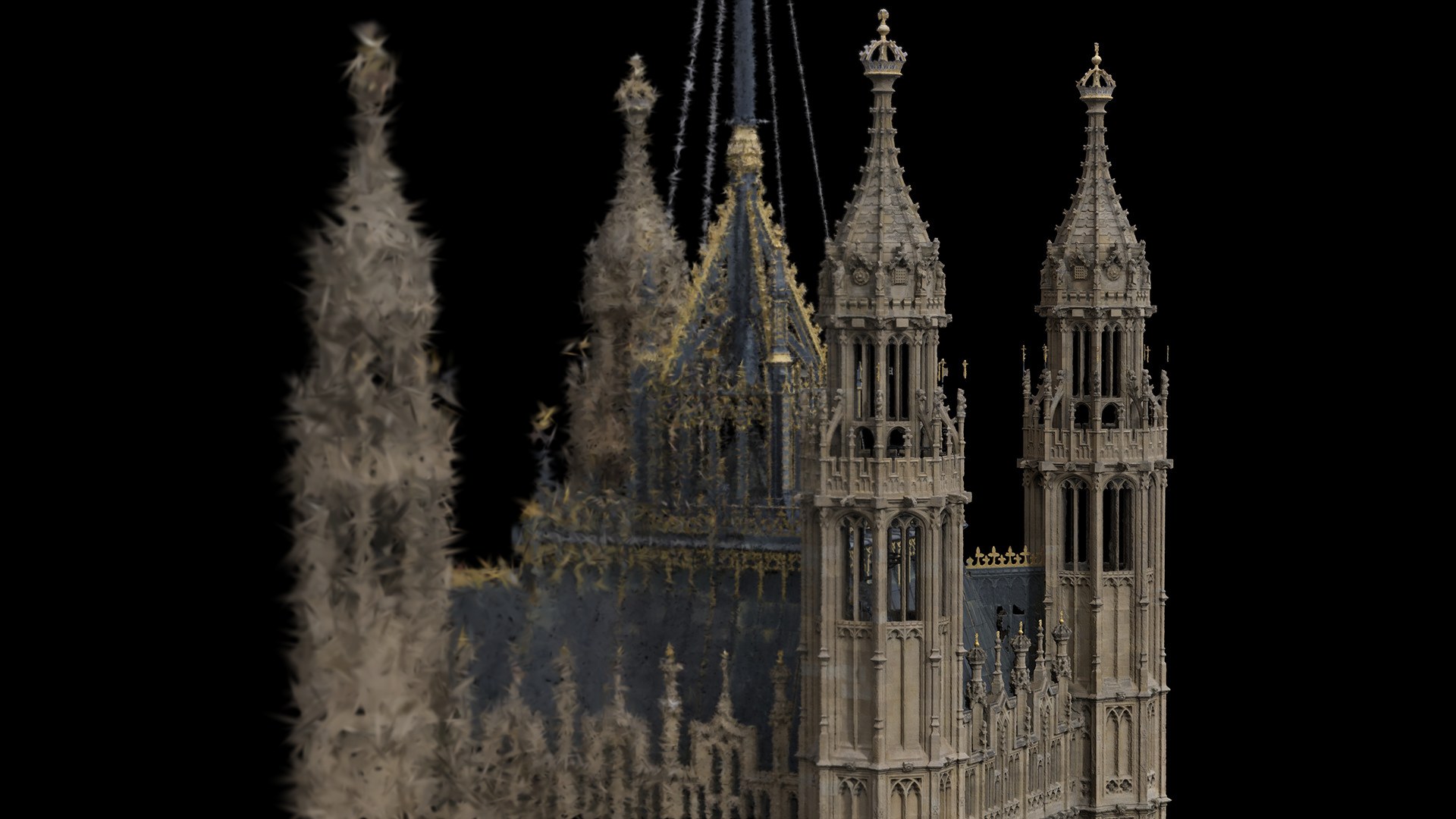
What is Gaussian splatting? Short answer: it’s a way of turning photos or video of a real place into a 3D scene that looks photographic from any angle and renders in real time. No mesh, no UV unwrap, no texture baking. Just millions of soft, coloured blobs that add up to something that looks uncannily like the real thing.
It has gone from a SIGGRAPH paper to a genuine on-set conversation in about three years. Every VFX supervisor we work with has asked about it at least once (usually right after seeing a splat of their own set on someone’s phone).
This guide covers what Gaussian splatting actually is, how it compares to photogrammetry, LiDAR and NeRFs, and where it earns a place in a film or TV pipeline today… and where it doesn’t. Yet.
First, though, it’s easier to show than to explain. Drag, scroll and pinch below.
What Is Gaussian Splatting?
Gaussian splatting (properly, 3D Gaussian splatting or 3DGS) is a technique that represents a 3D scene as a large cloud of semi-transparent, coloured ellipsoids called Gaussians. Each one is trained from a set of photographs so that, when they are all projected (“splatted”) onto the screen and blended together, they reproduce what a camera would see from that viewpoint.
The method was introduced in 2023 by researchers at Inria and the Max Planck Institute in the paper 3D Gaussian Splatting for Real-Time Radiance Field Rendering. Its big breakthrough was speed: photoreal novel views at real-time frame rates, on a single consumer GPU.
What Is a Gaussian Splat, Exactly?
So what are Gaussian splats, one at a time? A single Gaussian splat is a fuzzy 3D ellipsoid. On its own it looks like a smudge. A few million of them, each carefully sized and coloured, look like a film set.
Every splat stores four things:
- Position: where its centre sits in 3D space.
- Shape and orientation: how stretched and rotated it is (technically a covariance, stored as scale plus rotation). This is how splats become thin enough to describe a sharp edge or a strand of foliage.
- Opacity: how see-through it is.
- View-dependent colour: stored as spherical harmonics, so the colour shifts as you move around it. That is what gives splats believable sheen, reflections and specular highlights that a baked photogrammetry texture simply can’t hold.
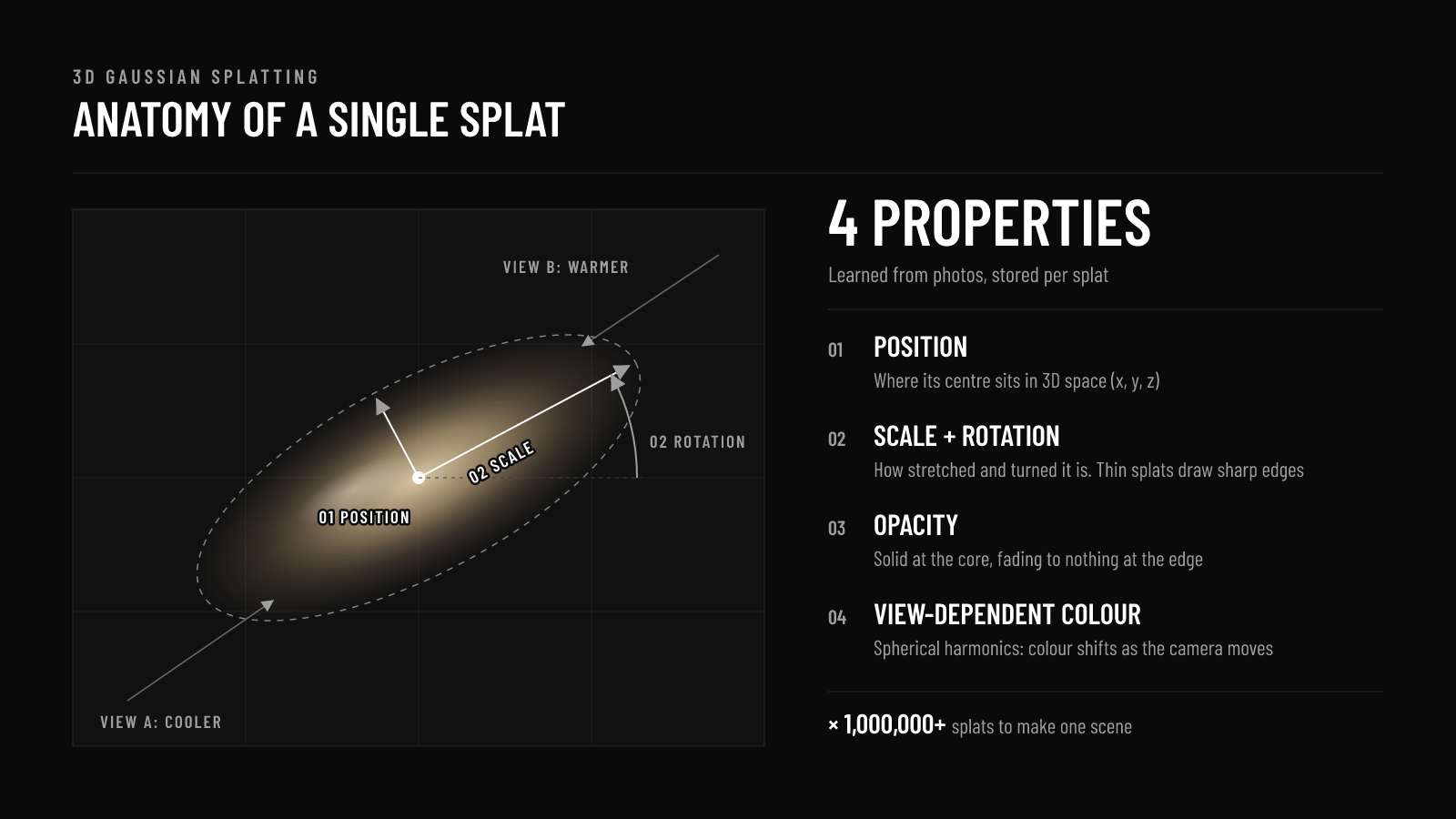
Think of a point cloud where every point has grown into a soft, tinted, directional blob. LiDAR gives you points that measure a surface. Splats give you blobs that reproduce how that surface looks.
How Does Gaussian Splatting Work?
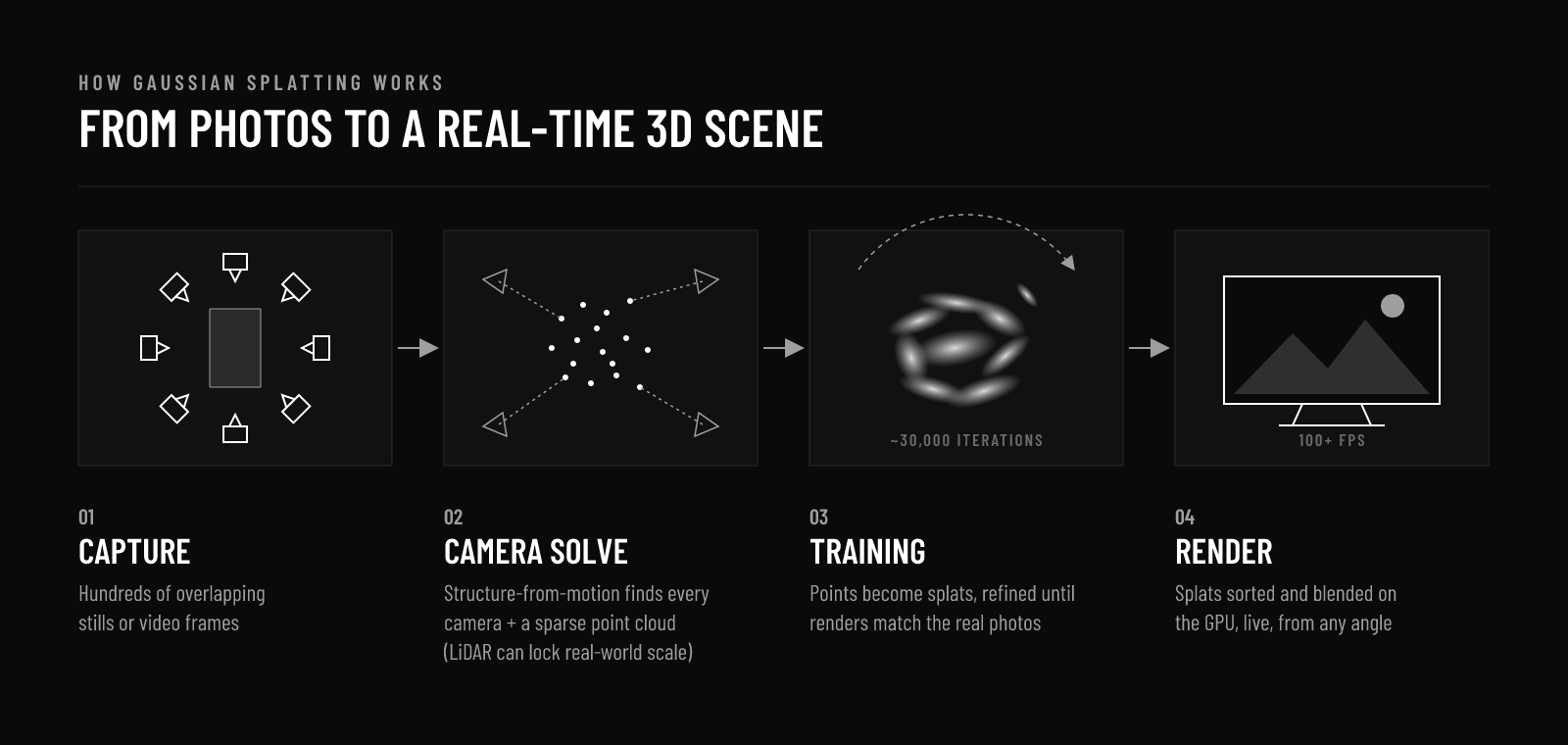
The workflow will feel familiar to anyone who has run a photogrammetry job. It diverges at the end.
- Capture. Stills or video of the subject, with heavy overlap, shot all the way around. The same discipline as photogrammetry applies: consistent exposure, no motion blur, cover every angle you might want to see later.
- Camera solve. Structure-from-motion software (COLMAP, RealityScan, Metashape) works out where every camera was and produces a sparse point cloud. A LiDAR scan can be used to anchor or replace this step, which gives the splat real-world scale.
- Training. Each sparse point becomes a starting Gaussian. The software renders the scene from each camera position, compares it to the real photo, and nudges every splat’s position, shape, opacity and colour to reduce the error. Splats are cloned, split and pruned as it goes. A typical set takes tens of minutes to a few hours on a decent GPU.
- Render. The trained splats are sorted by depth and blended onto the screen. Because this is rasterisation rather than ray marching, it runs in real time, even in a web browser.
Gaussian Splatting vs Photogrammetry vs LiDAR
This is the question we get most. The honest answer: they are not competitors. They answer different questions.
| LiDAR | Photogrammetry | Gaussian splatting | |
|---|---|---|---|
| Output | Point cloud (E57, LAS) | Textured mesh (OBJ, FBX) | Splat file (PLY, SPZ, SOG) |
| Best at | Measurement and scale | Usable geometry and texture | Photoreal appearance |
| Accuracy | Millimetre level | Good, needs scale reference | Visual, not survey grade |
| Reflections and glass | Struggles | Struggles | Handles well |
| Fine detail (hair, foliage) | Noisy | Often melts | Strong |
| Relightable | N/A | Yes (with albedo) | Not natively |
| Editable in DCCs | Yes | Yes, fully | Limited, improving fast |
| Real-time playback | Heavy | Yes, after optimisation | Yes, out of the box |
LiDAR tells you exactly where things are. Photogrammetry gives your artists geometry they can model, retopologise and relight. Gaussian splatting gives you the most convincing picture of what the place actually looked like on the day.
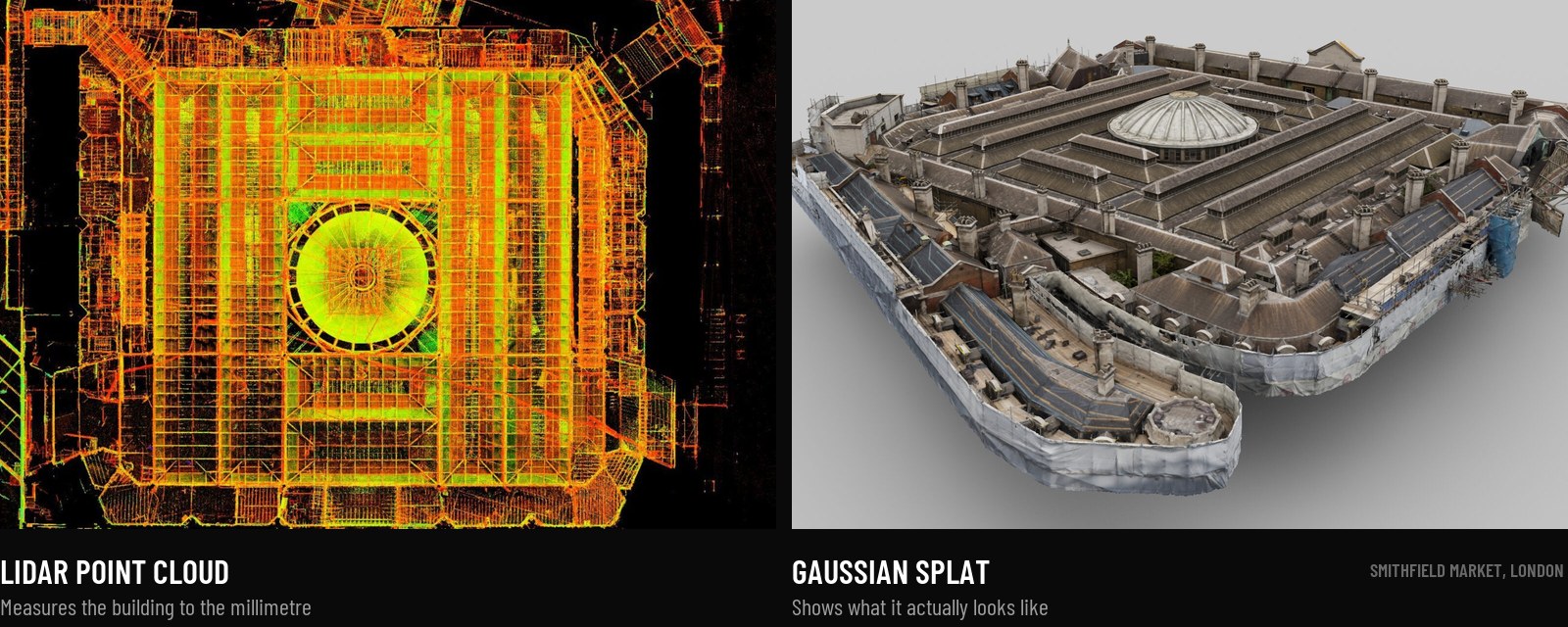
On a big show, you often want all three. That is one of the reasons we run LiDAR and photogrammetry capture on the same visit: the same photo set that feeds a mesh can train a splat, and the LiDAR locks both to real-world scale.
Gaussian Splatting vs NeRF
NeRFs (Neural Radiance Fields) arrived in 2020 and did something similar: learn a scene from photos, then render new viewpoints. The difference is how the scene is stored.
A NeRF hides the scene inside a neural network, and every pixel needs the network queried many times along a ray. That’s slow to render and almost impossible to edit, because there is nothing to select. A Gaussian splat is explicit: millions of actual objects sitting in 3D space. You can crop them, delete them, move them and render them fast.
For production use, splats have largely won that argument. Most tools that launched as NeRF tools now default to splats.
Where Gaussian Splats Fit in a VFX Pipeline
Here is where we see Gaussian splatting earning its keep on film and TV work right now.
Virtual recces and set reference
A splat of a location or a built set is the fastest way to let a director, DOP or VFX supervisor “stand” in it again weeks later. It opens in a browser, and it looks like the photos rather than a grey model. For departments that weren’t on the recce, it’s a revelation.
Previs and techvis
Dropping a splat into Unreal or a previs package gives shots a real-world backdrop long before final assets exist. Lenses and blocking can be tested against what the set actually looks like.
Virtual production backgrounds
For virtual production, splats are a strong option for mid-ground and distant environments on an LED volume, especially where foliage or complex dressing would take weeks to model properly.
Digital set archive
Sets get struck. Locations change. On shows like Project Hail Mary we scanned hundreds of props and environments for exactly this reason. A splat alongside the LiDAR is an inexpensive record of exactly how everything was dressed on the shoot day, which is exactly what you need when reshoots land six months later. (The same logic is why splats are catching on in heritage and construction too: we’ve written about LiDAR and 3D Gaussian splatting across the AEC lifecycle.)
Hard-to-model subjects
Glass, chrome, water, hair, fur, dense vegetation. The things that give photogrammetry a headache are often where splats look best. (Hero props still usually want a proper object scan as well, so artists have clean geometry to work with.)
What Gaussian Splatting Can’t Do (Yet)
Splats are brilliant. They are not magic. Before anyone rewrites a delivery spec around them, it’s worth knowing the limits.
- Lighting is baked in. A splat reproduces the light that was there on the day. Relighting it for a night shot or a new key light is still a research problem. It’s one we’re working on directly with Abertay University through the CoSTAR R&D programme.
- There’s no clean surface. No mesh means no easy collisions, shadow catchers, holdouts or simulation. Converting splats to meshes is possible but loses much of what makes them look good.
- Not a measurement tool. Splats are trained to look right, not to be dimensionally accurate. For matchmove and set extension you still want LiDAR underneath.
- Pipeline support is young. Unreal, Houdini, Nuke and Blender all have plugins or early native support, but nothing is yet as frictionless as dropping an Alembic into a comp.
- Floaters and gaps. Anything the cameras didn’t see turns into blurry haze or stray blobs. Splats punish lazy coverage even harder than photogrammetry does.
- File sizes. Uncompressed PLY files for a full set can run into gigabytes. Compressed formats like SPZ and SOG help a lot.
4D Gaussian Splatting: Volumetric Capture Gets Interesting
4D Gaussian splatting adds time. Instead of one frozen scene, you get splats that move: a performer captured from a multi-camera array, playable back from any angle, frame by frame.
For anyone who has worked with volumetric video, the appeal is obvious. Traditional volumetric capture produces a mesh sequence that often struggles with hair, loose clothing and fast motion. Dynamic splats handle those far more gracefully. It’s early, and data rates are hefty, but it is the most exciting thing happening in performer capture right now.
Gaussian Splatting Software
The tool landscape moves monthly, so treat this as a snapshot rather than a buyer’s guide.
- Training: Jawset Postshot, Nerfstudio (with the open-source gsplat library), Brush, and the original Inria reference code.
- Phone and cloud capture: Luma AI, Polycam, KIRI Engine and Scaniverse. Great for a quick look. Not what you want for a hero environment.
- Editing and viewing: PlayCanvas SuperSplat, a free Gaussian splat viewer and editor for cleaning, cropping and sharing in a browser. It is what powers the interactive embed at the top of this page.
- DCC and engine integration: plugins for Unreal Engine, Houdini, Nuke, After Effects and Blender, with native support starting to appear.
- LiDAR plus splat hardware: handheld SLAM scanners that capture LiDAR and imagery together and output splats directly, like the XGRIDS Lixel L2 Pro we used on the pumping station below.
As with any capture tech, the software matters less than the data going in. A careful capture on good glass beats a clever algorithm fed with phone footage every time.
How We Captured the Pumping Station Splat
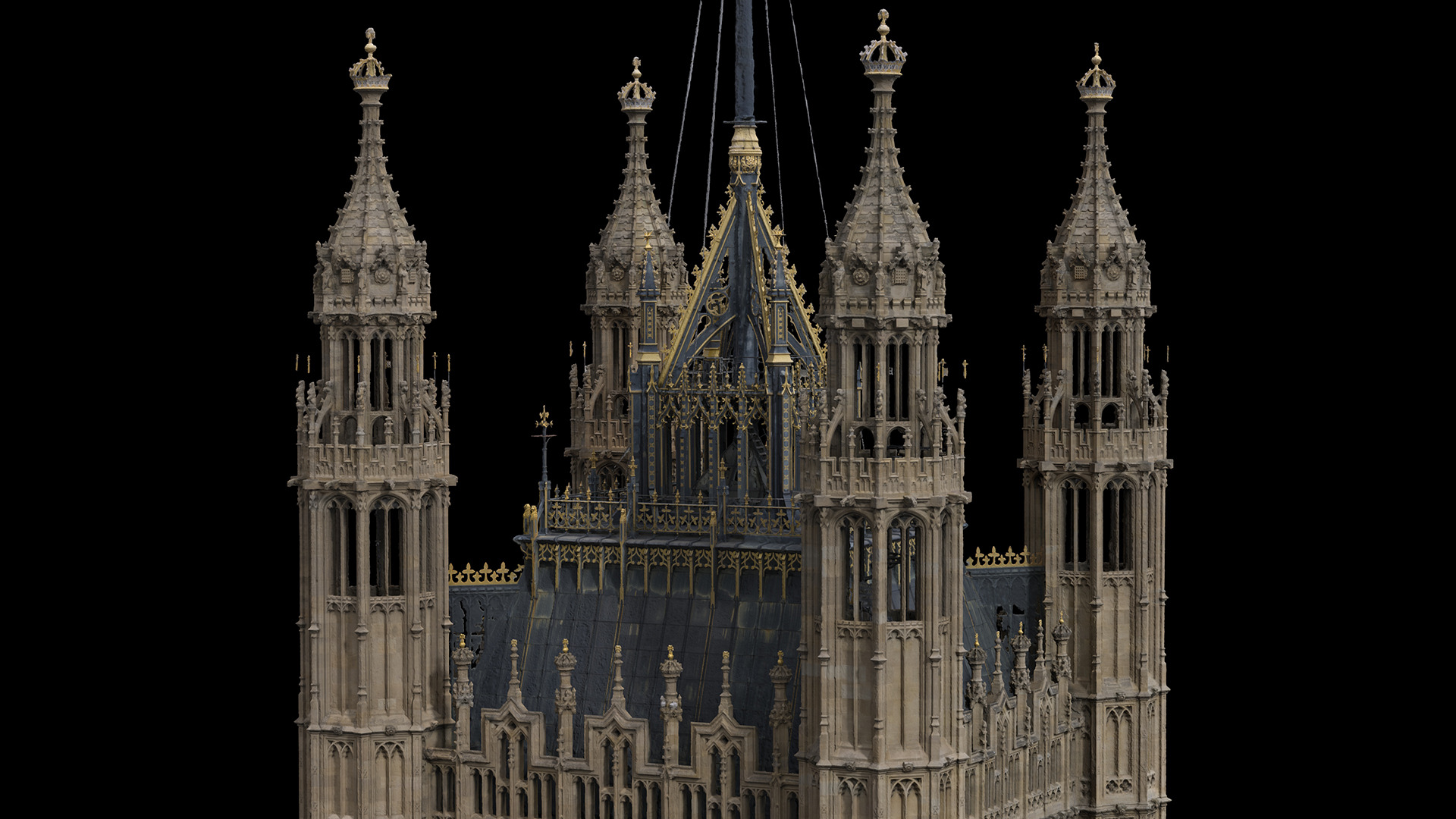
The splat at the top of this page is a Visualskies capture: a Victorian pumping station at King George V Reservoir in Enfield. Two pieces of kit did the work.
- Drone: aerial imagery of the roof, chimneys and upper facades. The parts nobody can see properly from the ground.
- XGRIDS Lixel L2 Pro: a handheld SLAM scanner that records LiDAR and imagery together as you walk. It covered the ground-level facades, doorways, the old pipework outside and the surrounding site, and its LiDAR gives the whole scene real-world scale.
The result is a single scene of 15.9 million splats. You can orbit it in the viewer above, and it’s the same data you see being “trained” in the motion graphic.
The takeaway for productions: a splat doesn’t need its own shoot. The drone and environment scanning kit already covering a location for survey and set extension can deliver one from the same visit.
Should Your Production Use Gaussian Splatting?
If you want a photoreal, explorable record of a set or location for reference, previs, recces or virtual production backgrounds: yes, and it adds very little to a scanning day that’s already happening.
If you need geometry to model on, measurements to track against, or assets that can be relit shot by shot: splats go alongside LiDAR and photogrammetry, not instead of them.
The good news is that the capture overlaps almost entirely. Plan the shoot properly and one visit to set can give your VFX team a point cloud, a mesh and a splat. Fewer vendors on the call sheet, fewer days on the stage, and nobody has to go back after the set’s been struck.
Gaussian Splatting FAQs
What is Gaussian splatting in simple terms?
It’s a way of rebuilding a real place in 3D from photos or video, using millions of soft coloured blobs instead of a polygon mesh. The result looks photographic from any angle and plays back in real time.
Is Gaussian splatting better than photogrammetry?
For visual realism, often yes, especially on reflective, transparent or very fine detail. For editable geometry, relighting and accurate measurement, photogrammetry and LiDAR are still the right tools. Most VFX productions benefit from having both.
Can you use Gaussian splats in Unreal Engine, Houdini or Nuke?
Yes, through a growing set of plugins and early native support. Integration is less mature than for meshes and point clouds, so it’s worth testing with your pipeline before committing a delivery to it.
Can you create a Gaussian splat from video?
Yes. Frames are extracted from the video and treated like a photo set. Stills from a proper camera generally give sharper results, because video frames suffer more from motion blur and compression.
Are Gaussian splats accurate enough for matchmoving?
Not on their own. Splats are optimised to look right, not to be dimensionally precise. Pair them with a LiDAR scan when accuracy matters.
What does splatting mean?
“Splatting” is an old computer graphics term for drawing 3D points by throwing (“splatting”) a small soft footprint of each one onto the screen, rather than drawing polygons. Gaussian splatting uses Gaussian-shaped footprints, which is where the name comes from.
What equipment do you need to capture a Gaussian splat?
Anything that produces well-overlapping, sharp images: a DSLR or mirrorless camera, a drone, or a handheld scanner that records imagery alongside LiDAR. We captured the pumping station in this guide with a drone and an XGRIDS Lixel L2 Pro. Phones work for quick tests, but not for hero environments.
What file format are Gaussian splats?
The original format is PLY. Compressed formats such as SPZ and SOG, and the .splat format used by many web viewers, are now common for delivery and sharing.
Want Your Set Captured as a Splat, a Scan, or Both?
Visualskies provides LiDAR, photogrammetry and cyber scanning for film, TV and virtual production, with Gaussian splat outputs planned into the same capture. Based in London, available worldwide.